
In the previous articles in the series we explored the basics of parser combinators and created a decently sized parser combinator library, capable of parsing various constructs of intermediate complexity. In this article, we’ll combine all the pieces we’ve built so far to create a JSON parser.
JSON Overview#
Why JSON? Javascript already has JSON.parse!
JSON (JavaScript Object Notation) is a lightweight data-interchange format, with pretty simple rules. It’s a great exercise for building a parser with a real-world application, but which is less complex than a full programming language.
The JSON format is so simple that its entire specification fits in a single page: https://www.json.org/json-en.html. We’ll use the handy diagrams on that page as a reference for our parser implementation.
Building the JSON Parser#
We’ll try to adhere to the naming conventions used in the JSON specification. We’ll start off with JSONs accepted “whitespace” characters, which are: space, tab, line feed, and carriage return, as shown in the diagram below:
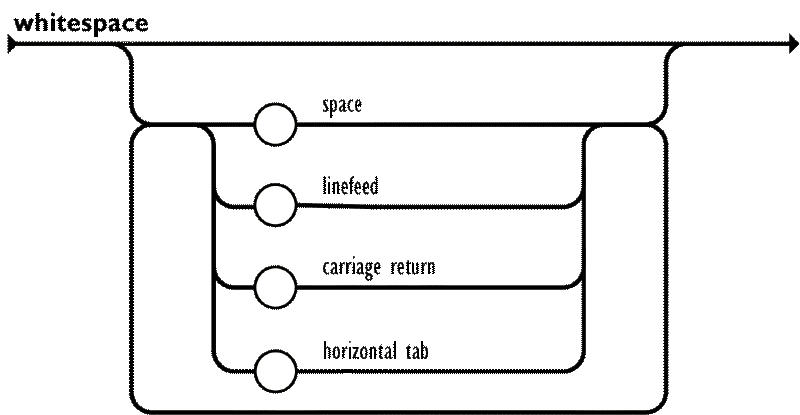
The previously defined P.whitespace() parser already handles the characters defined as whitespace in JSON, so we can use to to create an “any amount of whitespace” parser:
const ws = P.whitespace().many();The following parser for number literals will be the most verbose one, although the rules are quite intuitive:
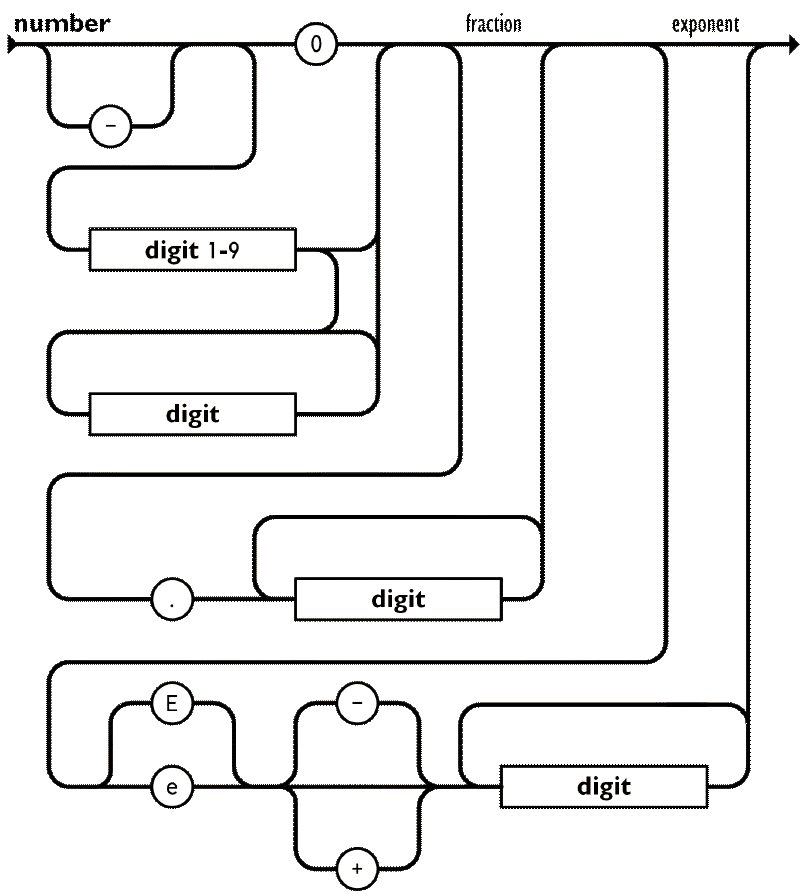
Here, although not necessarily needed, it would be helpful to implement a P.optional combinator, for implementing the optional “-” prefix for negative numbers:
class P<T> {
    optional(): P<T | null> {
		return new P<T | null>((input) => {
			const result = this.run(input);
			if (result.success) {
				return result;
			}
			return { success: true, value: null, remaining: input };
		});
	}
}
Number Literal Parser#
Next up comes the integer part of the number literal. We have already implemented a parser for this in the previous article, but let’s try a slightly different approach here that’s closer to the notation used in the JSON specification. Let’s also map the resulting string of digits to a number right away:
const onenine = P.dictionary("123456789");
const digit = P.char("0").or(onenine);
const digits = digit.many().map((chars) => chars.join(""));
const integer = P.seq([onenine, digits])
	.map(([first, rest]) => first + rest)
	.or(P.char("0"))
	.map(Number.parseInt);
Next comes the fractional part, which is optional:
const fraction = P.seq([P.char("."), digit.many1()])
	.map(([, fracDigits]) => `0.${fracDigits.join("")}`)
	.map(Number.parseFloat)
	.optional();
Finally, the exponent part, which is also optional:
const sign = P.char("-").or(P.char("+")).optional();
const exponent = P.seq([P.char("e").or(P.char("E")), sign, digit.many1()])
	.map(([, sign, digits]) => {
		const isPositive = sign !== "-";
		const exponentValue = Number.parseInt(digits.join(""), 10);
		return isPositive ? exponentValue : -exponentValue;
	})
	.optional();
This all comes together to form the final number parser:
const number = P.seq([integer, fraction, exponent]).map(
	([intPart, fracPart, expPart]) => {
		let value = intPart + (fracPart ?? 0);
		if (expPart !== null) {
			value *= 10 ** expPart;
		}
		return value;
	},
);
You can give it a try with tricky inputs such as -0.123e-45.
String Literal Parser#
This part would be easy if it weren’t for the escape sequences, such as \", or if you wanted to encode an emoji you’d use something like \ud83d\ude00. Well, at least in lower level language that work with bytes instead of graphemes. Let’s start with the easy part: parsing unescaped characters. According to the JSON specification, these are all characters except for " and \, and control characters (U+0000 through U+001F).
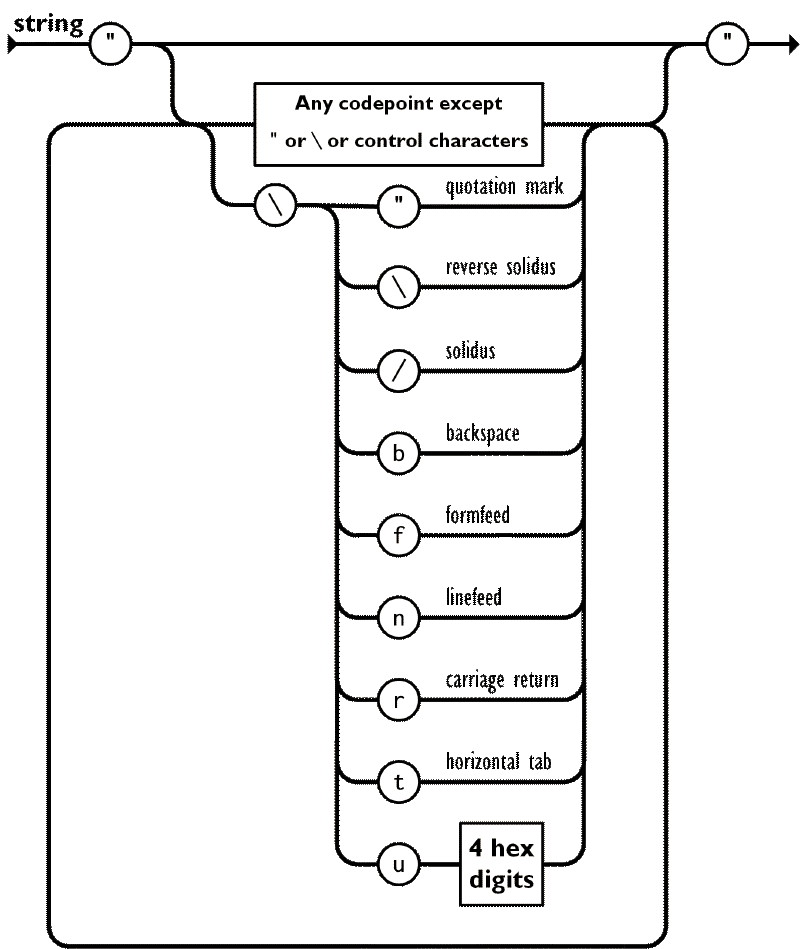
We can implement this in two ways:
- Adding a negative lookahead parser to exclude the unwanted characters.
- Adding an unicode range parser to include only the wanted character ranges.
Here, we’ll go with the first approach, implementing an any parser that accepts any single character, and an except combinator that excludes the given parser:
class P<T> {
    static any(): P<string> {
		return new P<string>((input) => {
			if (input.index < input.text.length) {
				const char = input.text[input.index];
				return {
					success: true,
					value: char,
					remaining: { text: input.text, index: input.index + 1 },
				};
			}
			return { success: false };
		});
	}

    except<U>(other: P<U>): P<T> {
		return new P<T>((input) => {
			const otherResult = other.run(input);
			if (otherResult.success) {
				return { success: false };
			}
			return this.run(input);
		});
	}
}
Let’s go bottoms-up in creating the string literal parsers, with the following order:
- Hexadecimal digit parser
- Unicode escape parser
- Escape sequence parser
- String literal parser
const hex = P.dictionary("0123456789abcdefABCDEF");
const unicodeEscape = P.seq([P.char("u"), hex, hex, hex, hex])
	.map(([_, ...chars]) => Number.parseInt(chars.join(""), 16))
	.map((num) => String.fromCharCode(num));

const escapeCharMap = {
	"\\": "\\",
	"/": "/",
	'"': '"',
	b: "\b",
	f: "\f",
	n: "\n",
	r: "\r",
	t: "\t",
} as const;

const escapeSeq = P.seq([
	P.char("\\"),
	unicodeEscape.or(
		P.dictionary('\\/bfnrt"').map(
			(char) => escapeCharMap[char as keyof typeof escapeCharMap],
		),
	),
]).map(([, char]) => char);
This leaves us with the string literal parser itself. Since our implementation of many is greedy, we need to exclude " from the excluded characters within the string, as the many parser will try to parse that as the content of the string and never reach the terminating " character:
const character = escapeSeq.or(P.any().except(P.dictionary('\\"')));

const string = character
	.many()
	.between(P.char('"'))
	.map((chars) => chars.join(""));
And to test some edge cases out:
console.log(string.parse('"\\uD83E\\uDD76"')); // Should parse to '🥶'
console.log(string.parse('"Hello\\", World!"')); // Should parse to 'Hello", World!'
Recursive Structures#
Now that we have parsers for the harder primitive types (booleans and null are trivial to implement), we can move on to the recursive structures: arrays and objects. Taking from the JSON specification again, we have the following diagrams for the value construct:
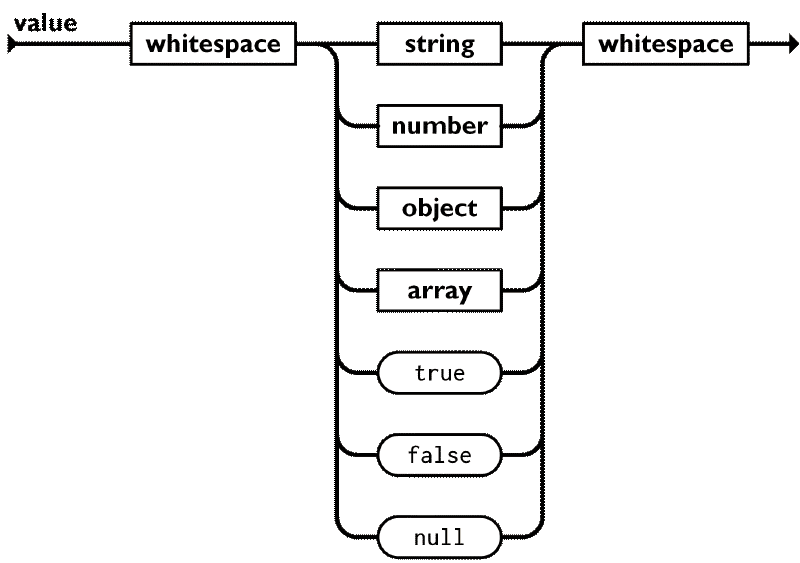
A value can be any primitive type, and array or object, surrounded by optional whitespace. Now, if we look at the diagram for arrays:
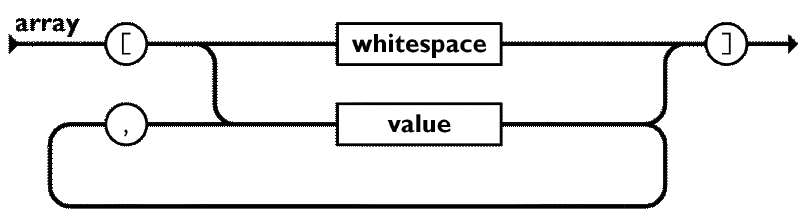
The diagram references the value construct itself, making a circular dependency. We encountered this problem in the previous article as well, when implementing a simple nested array parser. Let’s start by implementing the value type, using some placeholders for the array and object parsers for now:
const boolean = P.string("true")
	.or(P.string("false"))
	.map((str) => str === "true");
const nullParser = P.string("null").map(() => null);

type JsonValue =
	| boolean
	| number
	| string
	| null
	| JsonValue[]
	| { [key: string]: JsonValue };
const value: P<JsonValue> = P.lazy(() =>
	boolean.or(nullParser).or(number).or(string).or(array).or(object).between(ws),
);

const array = P.string("unimplemented");
const object = P.string("unimplemented");
It’s a bit incomplete, since it obviously has placeholders, but you can test it with primitive values. Getting back to the array parser, we can now implement it properly:
const emptyArray = ws.between(P.char("["), P.char("]")).map(() => []);
const array = emptyArray.or(
	value.sepBy(P.char(",")).between(P.char("["), P.char("]")),
);
The object parser is quite similar, just with key-value pairs instead of single values. It’s best to refer to the JSON specification diagram for objects:
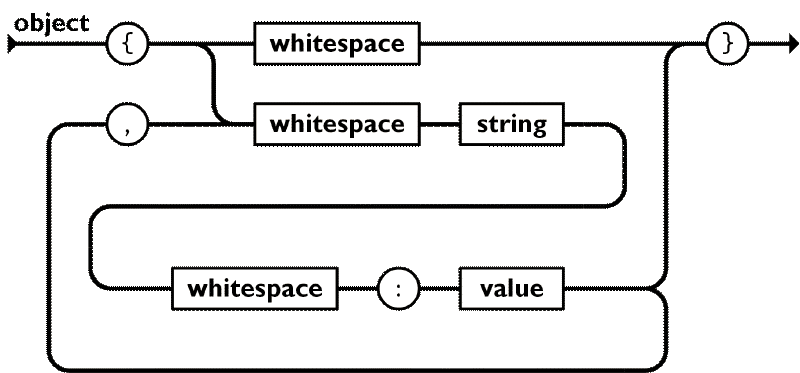
This might be the harder of the parsers, at least because of all the whitespaces involved.
const emptyObject = ws.between(P.char("{"), P.char("}")).map(() => ({}));
const object = emptyObject.or(
	P.seq([string, P.char(":").between(ws), value])
		.map(([key, , val]) => [key, val] as const)
		.sepBy(P.char(","))
		.between(ws)
		.between(P.char("{"), P.char("}"))
		.map((pairs) => {
			const obj: { [key: string]: JsonValue } = {};
			for (const [key, val] of pairs) {
				obj[key] = val;
			}
			return obj;
		}),
);
And believe it or not, that’s it! Our value parser is fully functional now, and can parse any valid JSON input. If you didn’t follow along in your editor, but would like to test this out, the full code is available in this Gist.
Drawbacks and Limitations#
Hopefully after following this series you came to admire the beauty and expressiveness of parser combinators, and wonder why they aren’t more widely used and taught in your typical university curriculum.
Yes, I skipped over some details which are crucial for a production-ready library for the sake of brevity, such as error handling, metadata tracking (line and column numbers) and performance optimizations (packrat parsing). However, even with those implemented, parser combinators have some inherent drawbacks:
- Left Recursion: You might have observed how, when using the
P.lazycombinator, every time self-referential parsers were left at the right-hand side of an.or()combinator chain. This is because parser combinators cannot handle left-recursive grammars, as doing so would lead to infinite recursion. It’s always possible to rewrite left-recursive grammars to be right-recursive though, but that might be awkward in some cases. - Performance: Parser combinators are bound to be slower than hand-written parsers or parser generators (such as ANTLR), due to the overhead of function calls and object allocations. Even writing a recursive descent parser via loop constructs and mutable state, with the same backtracking capabilities and flow control as parser combinators, would be faster. When thinking of asymptotic performance, parser combinators can be exponential in the worst case (although with memoization this can be improved to linear time at the cost of memory usage). Think of parsing a recursive structure with multiple possible interpretations for each element.
- Stack Overflows: Deeply nested structures can lead to stack overflows, since each parser invocation adds a new frame to the call stack. A maximum recursion depth can be enforced, and that’s usually done with other parsing strategies as well, but it’s easier to hit the limit of recursion with parser combinators.
- Error Reporting: Parser combinators use top-down parsing with backtracking, which would never be as good for the developer experience as bottom-up parsing strategies. In the best case, we can report the furthest point reached in the input and give a hint about what was expected there, but we can’t provide context-aware error messages like “missing semicolon at the end of the statement” or “unmatched parenthesis”, since we don’t have a full parse tree to analyze (or at the very least it’s not trivial). Additionally, with bottom-up parsers it’s possible to report multiple errors in a single pass, which is crucial for large codebases or even large files.
Conclusion#
In this article we built a fully compliant JSON parser using the parser combinator library we started in this series.
While parser combinators might not be the best tool for programming language parsers or other very complex grammars that require extensive error reporting, their expressiveness and ease of use make them a great choice for simple data formats, implementing niche data format parsers, and prototyping data formats and languages.
We have not yet explored the full potential of parser combinators. If you’d like to take this further, try implementing:
- Error reporting
- Context-aware parsing (e.g. indentation-sensitive parsing)
- Performance optimizations (e.g. packrat parsing)